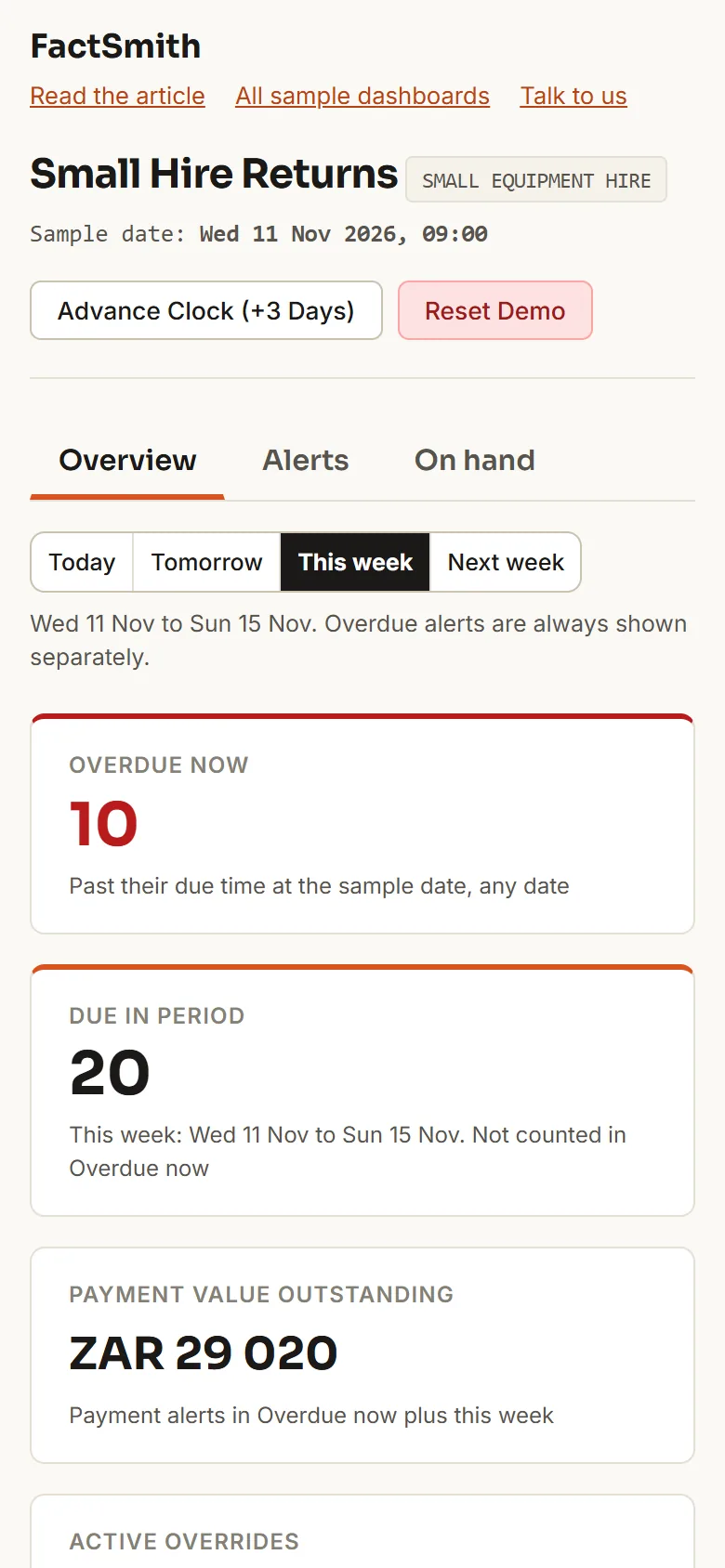
Small Hire Returns is a sample dashboard for a small equipment hire counter. It shows what is due back today, tomorrow, this week and next week, what is already overdue, which customers owe money, and how many of each item will be free to hire. Every customer, depot, item and amount is invented, and every figure in this article comes from that sample. Open the Small Hire Returns dashboard.

Scan to open the dashboard on your phone
The first visit downloads about 34 MB before compression, so Wi-Fi is better.
Why is a list of overdue hires not enough?
An overdue list tells a counter about a problem after it has started. By then the plate compactor may be booked out again to someone else, and the customer who kept it is not answering the phone.
Small equipment hires are short, often hours rather than weeks. One contract can carry a trestle set of six or four ladders, so one late contract can leave several items missing from the yard.
What does the Overview show?
The Overview tab is the summary for one chosen time period. Choose Today, Tomorrow, This week or Next week; This week is the default and the same choice applies to every tab.
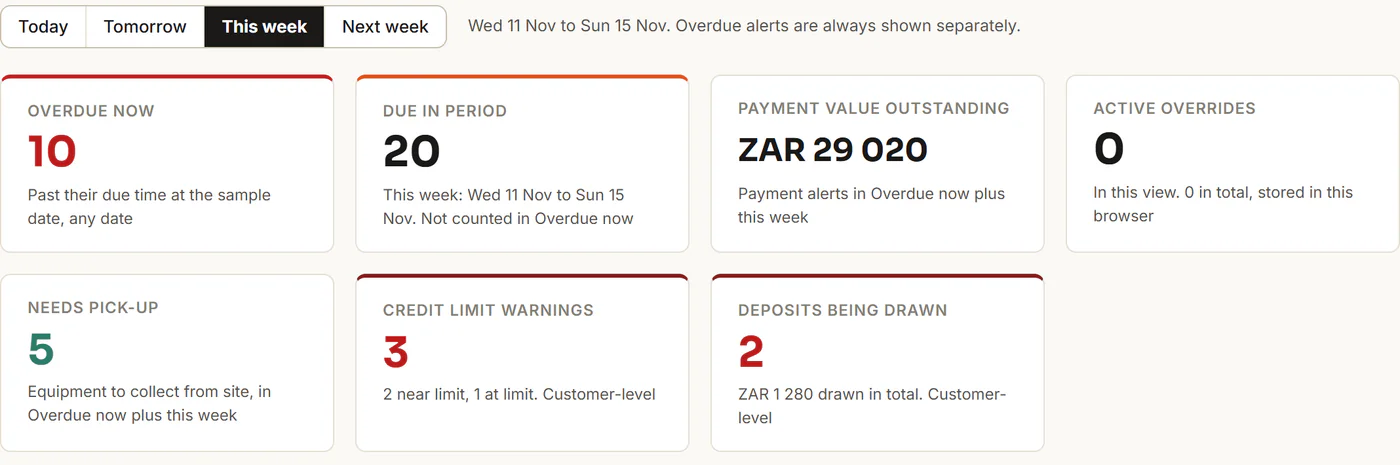
The sample date is Wednesday 11 November 2026, 09:00. This week runs to Sunday 15 November, and Next week is Monday 16 to Sunday 22 November. Overdue alerts, whose return or payment time has passed, are never hidden by the period: they sit in their own group, Overdue now, and are not counted inside Due in period, so the numbers add up. In the sample:
| Period | Overdue now | Due in period |
|---|---|---|
| Today | 10 | 6 |
| Tomorrow | 10 | 5 |
| This week | 10 | 20 |
| Next week | 10 | 22 |
An item due later today than the sample time counts as Today, not as overdue. One pick-up booked for 08:00 this morning is already in Overdue now.
The sample has 52 alerts across four invented depots: 25 returns, 8 pick-ups and 19 payments. A return is the customer bringing an item back to the counter. A pick-up is equipment the hire company must collect from the customer’s site, so it needs a driver, a time and a site address. Cards include Needs pick-up, Credit limit warnings and Deposits being drawn; the last two are about customers, not the period you picked.
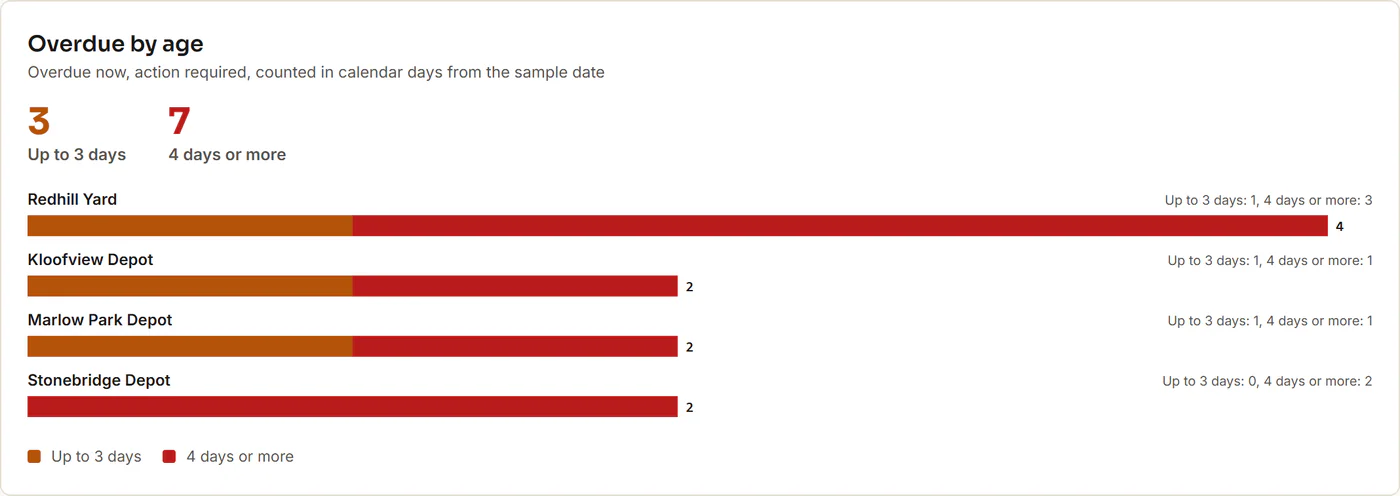
One day late is not the same as eight, so the Overdue by age panel splits Overdue now by calendar days late. Of the 10 overdue alerts, 3 are up to 3 days late (one is due earlier today, so it is 0 days) and 7 are 4 days or more, the oldest 8 days. The Advance Clock (+3 Days) button moves the sample date to Saturday 14 November: Overdue grows to 28 (19 up to 3 days, 9 at 4 days or more) and This week shrinks to 2.
How do the Alerts and the contract card work?
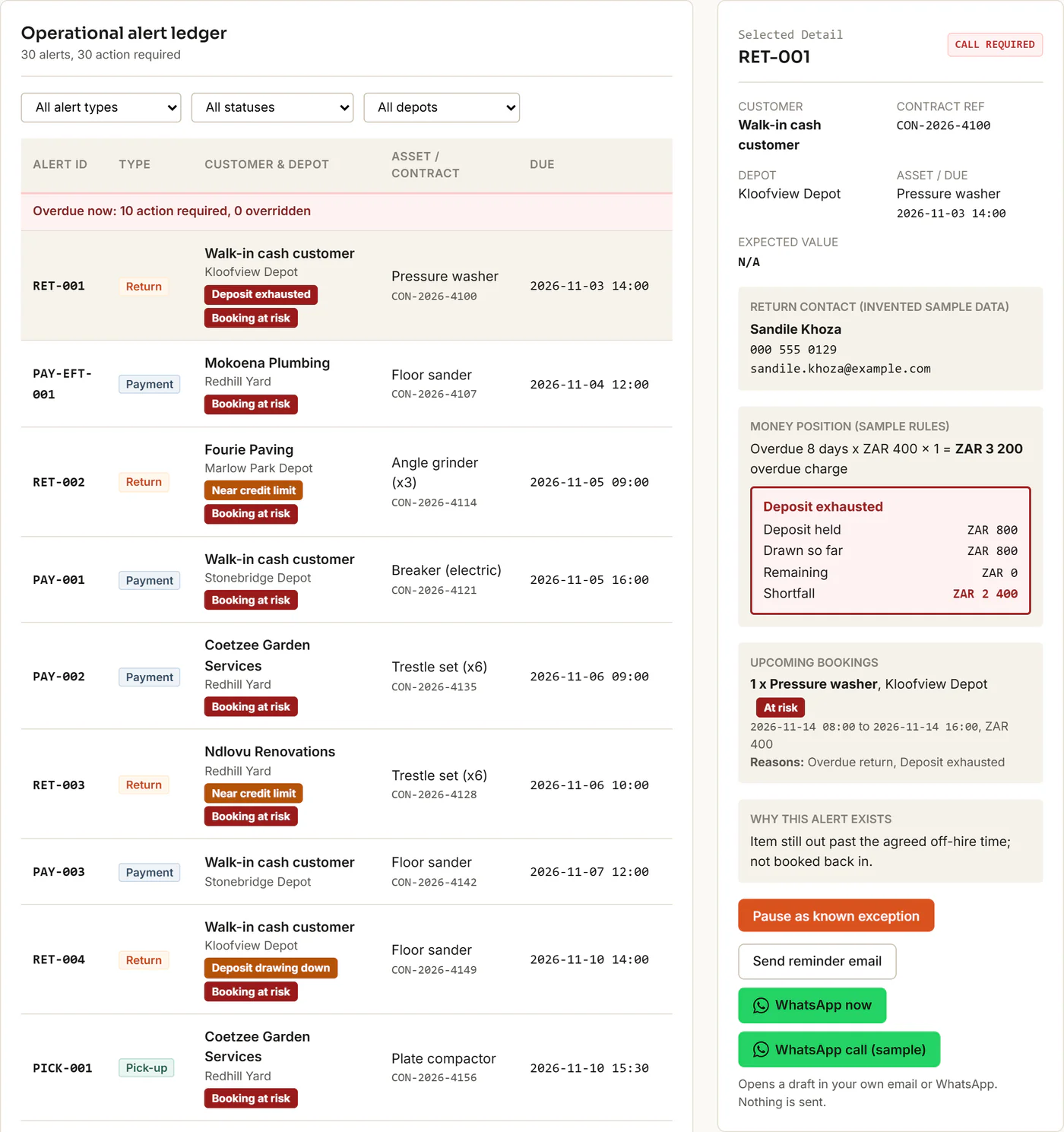
The Alerts tab is the working list, and the contract card is where the counter picks up the phone. The list has filters for type, status and depot, with Overdue now above the chosen period, and the call list below follows the same view. On a phone, choosing a row opens the card as a sheet over the page.
The card shows the customer, depot, item, due time, a plain line headed Why this alert exists, an invented contact person, the customer’s deposit or credit position and their upcoming bookings.
While an alert needs action, the card offers Send reminder email, WhatsApp now and a WhatsApp call (sample) button. The first two open a draft in your own email program or WhatsApp with a polite message already written. The demo sends nothing. The WhatsApp draft carries no phone number, so WhatsApp asks you to choose the recipient, and the contact emails and phone numbers are deliberately not real. All three buttons disappear while an override is active.
A reported EFT is not a recognised payment, so the dashboard keeps it open until someone confirms it.
Can the counter call a customer on WhatsApp?
Not in this sample, but a live version could. The WhatsApp call (sample) button on the contract card is a demonstration only. It places no call and sends nothing; it shows a short message with the contact’s name.
In a live setup for a hire company, it would work like this:
- The hire contract includes the customer’s agreement to WhatsApp reminders and calls.
- When the hire starts, the counter sends WhatsApp’s permission request and the customer approves it there, at the counter.
- The approval is remembered. After that, the card’s WhatsApp call button can call that customer from the hire company’s own WhatsApp Business account.
A live version needs the hire company’s WhatsApp Business account connected for calling, and it depends on WhatsApp’s current rules.
What does On hand and Free to hire mean?
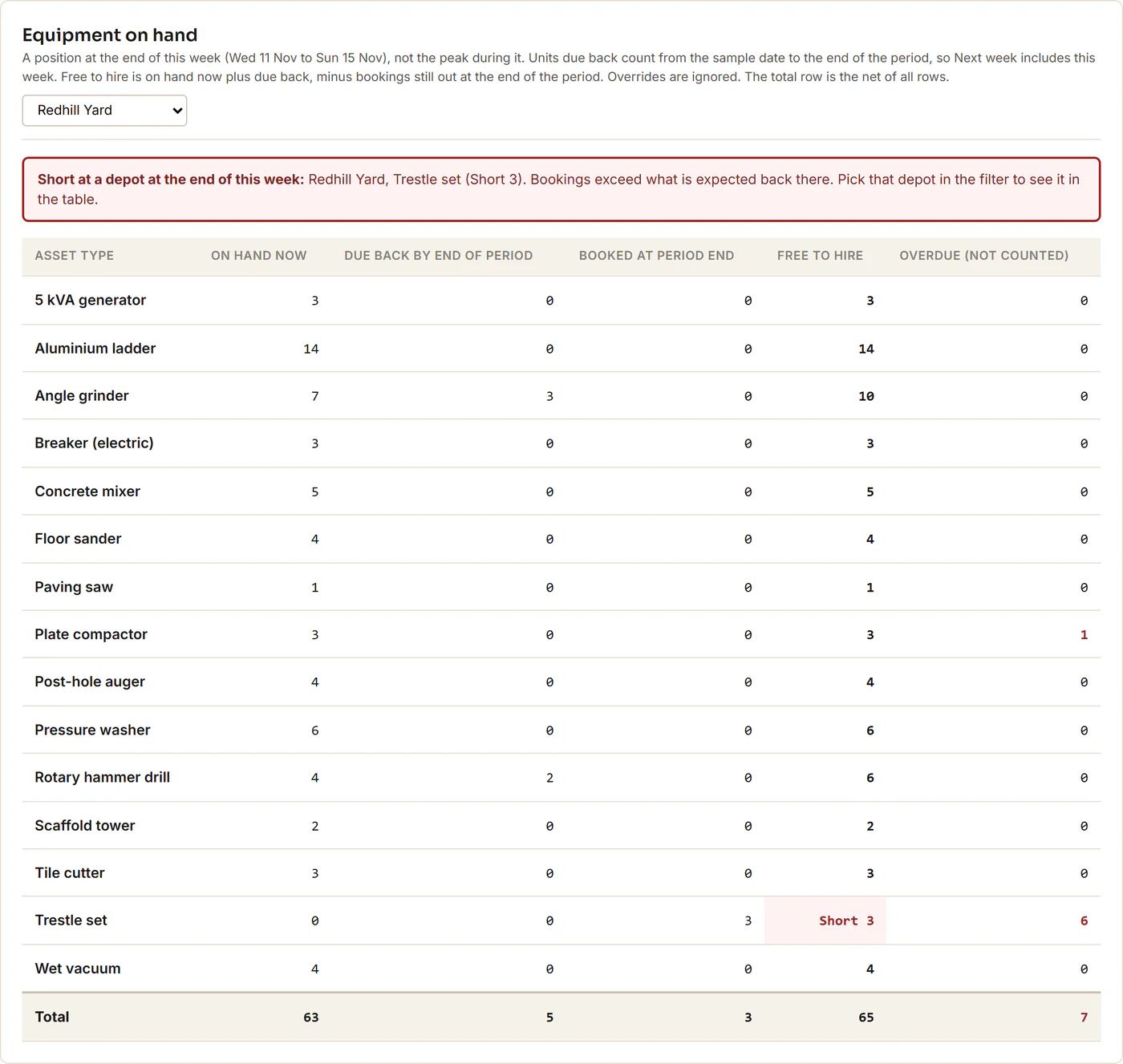
Free to hire is how many of an item you could hire out again at the end of the chosen period. It is the units on the shelf now, plus the units due back by the end of the period, minus the bookings still out at that point. Overdue units are never counted as coming back.
The On hand tab shows this by item type, for all depots or one depot, as a position at the end of the period, not the peak during it. When bookings are larger than what is on hand plus due back, it shows Short. In the sample, across all depots, Free to hire is 290 units at the end of Today, 285 Tomorrow, 301 This week and 325 Next week. Redhill Yard is short 4 trestle sets at the end of tomorrow and 3 at the end of this week, because the 6 trestle sets on alert RET-003 are overdue and not counted as coming back. Overrides do not change these figures.
Why is an overdue hire costly?
An overdue return uses up the customer’s deposit, or pushes a credit customer toward their limit. In this sample, an overdue return accrues a charge equal to the calendar days overdue times the daily rate times the quantity. Pick-ups and payments accrue nothing. The charge rule, credit limits and the 80% warning line are sample assumptions, not any real company’s terms.
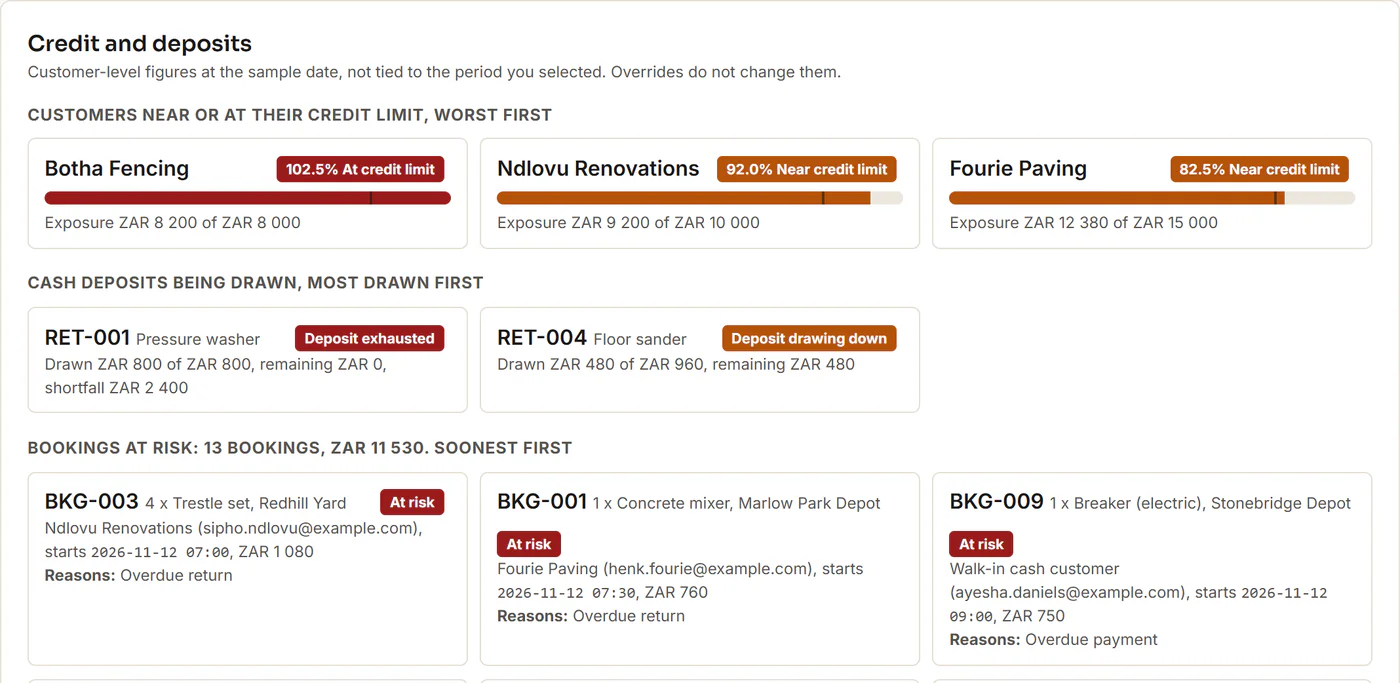
Deposit drawdown is the part of a cash customer’s deposit that overdue charges have already used. RET-001, a pressure washer with a ZAR 800 deposit, is 8 days overdue: the charge is ZAR 3,200, so the deposit is used up and ZAR 2,400 is still owed. RET-004, a floor sander, is 1 day overdue: ZAR 480 of its ZAR 960 deposit is drawn and ZAR 480 remains. In total 2 deposits are being drawn, ZAR 1,280. Three days later that is 6 deposits and ZAR 6,310.
Credit exposure is a credit customer’s balance plus the overdue charges on their returns, shown against their credit limit. In the sample, Fourie Paving has a ZAR 15,000 limit and an exposure of ZAR 12,380 (82.5%), which counts as near the limit. Ndlovu Renovations is near its limit at 92.0%, and Botha Fencing is over, at 102.5%. That is 3 credit limit warnings. After the three days, Ndlovu goes over (114.2%) and Coetzee Garden Services moves to near (88.5%).
Which bookings are at risk?
A booking is at risk while its customer already has an unresolved problem on the account. That means an overdue return or payment that needs action, a used-up deposit, or a credit limit that is reached. At the sample date that is 13 of the 28 upcoming bookings, worth ZAR 11,530. The Alerts list marks those rows with a Booking at risk badge.
What is a known exception, and how do I pause one?
A known exception is an alert the counter has already looked at and agreed to leave alone for a while. Every counter has them: the customer who has paid by EFT but whose payment has not shown up in the bank feed yet.
Take PAY-EFT-003 in the sample. Mokoena Plumbing reported an EFT of ZAR 1,100 for a generator hire, due Thursday 12 November at 12:00, and the payment is not yet recognised on the account.
Once the counter has spoken to the customer, open the alert, choose Pause as known exception, pick a reason (here, EFT pending recognition), write a short note and choose 1, 2 or 5 days, with 2 as the default. Then choose Save override. The alert shows as Overridden and leaves the call list. For This week, Due in period would go from 20 to 19 and Payment value outstanding would drop by the ZAR 1,100.
When the expiry passes, the alert returns on its own, and you can clear an override at any time. Each override is saved only in your browser, and Reset Demo clears all overrides and restores the sample date after you confirm.
What stays unchanged in the hire system?
Everything. An override changes nothing in the hire system or the finance system. It does not mark anything paid or returned. It is a note held next to the alert, saying that someone has looked at it, why, and until when. Deposit, credit and free-to-hire figures do not change either.
What should I know before opening the dashboard?
- The first visit downloads about 34 MB before compression. Allow a few seconds.
- Use one tab at a time. A second tab asks you to close the other one.
- Changes are saved only in this browser. Reset Demo clears them.
- Everything is invented. The customers, depots, equipment, amounts and bookings are made up, and the thresholds and rules are sample assumptions.
Common questions
How do I see what is due back this week in Small Hire Returns?
Open the Alerts tab and keep This week selected: 10 overdue alerts sit in their own group, and 20 more are due this week.
How do overdue hires affect a customer’s deposit?
Each calendar day an item is overdue draws down the cash customer’s deposit by the day’s hire charge. RET-004, one day overdue, has used ZAR 480 of its ZAR 960 deposit. The charge rule is a sample assumption.
What does free to hire mean?
The units you could hire out again at the end of the chosen period. In the sample it is 301 units across all depots at the end of this week.
How do I know if a customer with overdue equipment has more bookings coming?
Open the customer’s alert and read the bookings on the contract card. In the sample, 13 of 28 bookings are at risk.
What does pausing an alert as a known exception do?
It hides the alert from the call list until the expiry you chose, 1, 2 or 5 days, and records a reason and a note. It does not mark anything paid or returned.
Can the counter call a customer on WhatsApp from the dashboard?
Not in this sample: the WhatsApp call (sample) button places no call. In a live setup the customer agrees in the hire contract and approves WhatsApp’s permission request when the hire starts, and the button then calls from the hire company’s own WhatsApp Business account, subject to WhatsApp’s current rules.
Does the dashboard send reminders or change my hire system?
No. The reminder buttons open a draft in your own email program or WhatsApp and nothing is sent. The sample customers are invented and their phone numbers are not real lines.
Open the Small Hire Returns dashboard
Scan to open the dashboard on your phone
The first visit downloads about 34 MB before compression, so Wi-Fi is better.