Hire Live returns is a sample dashboard for a large and mining equipment hire depot. It keeps return risk and payment risk apart, lets staff pause a known EFT exception with a reason and an expiry, and leaves a short call list of what still needs attention. Every depot, customer, contract and amount is invented.
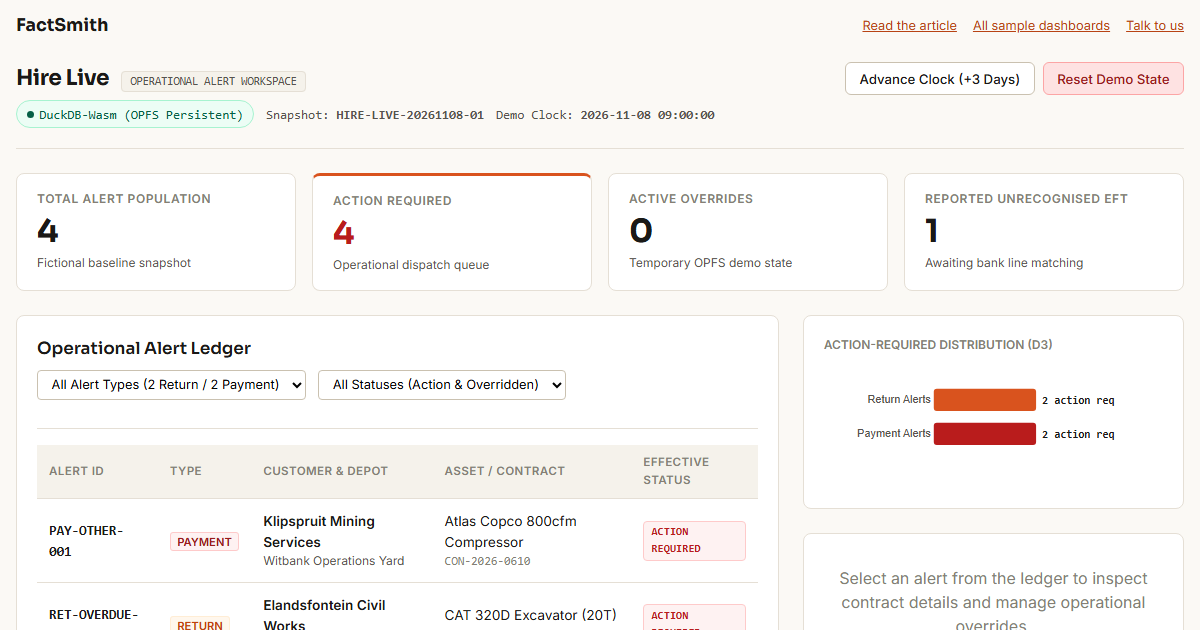
The hire system says the machine is overdue. The customer says the EFT was paid. The depot manager says two more days were approved. A normal overdue report only shows the problem. This dashboard separates return risk from payment risk, lets staff pause a known exception with a reason, and leaves a short list of what still needs a call.
The overdue report arrives too late
A conventional overdue report shows assets only after their expected return date has passed. Hire staff also need to see what is due today and tomorrow. A late asset and a late payment are different problems, and the hire system can lag behind an EFT, a verbal extension or a manager’s leniency. When the same known exception keeps appearing, the alert list gets harder to trust.
The useful question is not simply “What is overdue?” It is “What needs attention now?”
The dashboard: what needs attention
The demo opens on four fictional alerts as of the demo clock, 2026-11-08 09:00 (South African time):
RET-OVERDUE-001: an excavator 40 hours past its off-rent time without an extension.RET-TODAY-001: a roller due back at close of business today.PAY-EFT-001: a backhoe loader with an EFT proof submitted via the portal, not yet reconciled in the bank feed.PAY-OTHER-001: a compressor with a returned direct debit and no operational response for 72 hours.
Summary cards, an alert ledger with filters, and a small D3 chart all follow the same data. Return alerts and payment alerts stay separate.
One alert is not what it seems
PAY-EFT-001 is Umgeni Earthmoving Pty at the Pinetown Industrial depot, with ZAR 28,450.00 expected. The customer says the EFT was made. The hire system has not recognised it.
The dashboard must not mark that payment as settled, and it does not. A reported EFT is not a recognised payment. What staff can do is record that they already know about the case and pause the immediate alert for a limited time.
The inline override
- Select
PAY-EFT-001and choose to apply an override. - Pick the reason code
EFT_PENDING_RECOGNITION. - Enter a short note (1 to 250 characters).
- Choose a duration of 2 demo days and confirm.
The alert becomes OVERRIDDEN. Action-required drops from 4 to 3, active overrides rises to 1, and the alert stays visible in the ledger with its reason and expiry. The cards, chart and lists update without a page reload.
The override is stored in the browser, in a DuckDB database on the Origin Private File System, and survives a reload of the same tab. Clearing it, or advancing the demo clock past its expiry with the “Advance Clock (+3 Days)” control, returns the alert to the action-required count. Expired overrides keep their history rather than being marked as cleared.
This is demo-level, browser-local state. It does not recognise the payment, amend a contract or update any hire, finance or BigQuery record.
What the next question looks like
The dashboard answers the recurring question with fixed definitions. The next question is different: which of these cases needs action first, and why? That is where a conversational assistant such as Claude is useful, working from the dashboard’s alert list and stating any filters or priority basis it adds. This build does not include a chat feature; this section describes how the two would sit side by side, not something the dashboard does.
The call list
In this build the call list is the “Remaining Call & Action List” panel. The effective-status logic is a SQL view, v_effective_alerts, in DuckDB; the panel shows the rows from that view where action_required is true (the final filter on those rows is applied in the page code). After the EFT override it shows three alerts; with no active override it shows four. A richer call list with contacts, days overdue and a suggested next action is the kind of task-specific output that does not justify another permanent dashboard page. It is not part of this build.
Side by side
The D3 dashboard gives everyone the same view on the recurring questions, shows return and payment risk separately, supports record-level inspection, and records and clears temporary demo overrides inline.
A conversational assistant takes the next question as it comes, can explain the records behind a result, and can produce the working output for the next job, as long as it says which definitions it changed.
Where they can disagree
The dashboard uses fixed alert definitions and a fixed demo snapshot. A custom query may broaden or narrow the period, filters or records, and must say so rather than present its result as the dashboard number. An override changes the effective action queue, not the underlying return or payment fact.
The shared model underneath
Both would work from the same small dataset and the same flattened alert view, with stable alert identifiers. The model is deliberately small because this is a demonstration, not a production hire platform. The four baseline alerts come from a fictional, hand-built snapshot. No BigQuery connection or BigQuery-derived data is used, and the reference query shown in the page is still marked “Reference query pending final insertion”.
Closing
An overdue report is useful when the world matches the system. Hire operations often do not. This demo keeps the fixed view, makes the known exception visible, and leaves a short list of what still needs a call.
What to know before you open it
- Download. The DuckDB-Wasm engine files are fetched from the jsDelivr CDN at runtime on first load, about 34 MB before compression.
- One tab. The database lives in the browser’s Origin Private File System. A second open tab cannot share it and will show an error instead.
- Reset. Clearing the browser’s site data, or using Reset Demo State, removes your overrides.
- Limits. Persistence is browser-local and checkpointed after each change. There is no audit trail, no multi-user sync and no production access control.
Common questions
What is the Hire Live returns demo?
A sample dashboard for a large and mining equipment hire depot, on invented data. It shows four fictional alerts: an excavator 40 hours past its off-rent time, a roller due back at close of business today, a backhoe loader whose EFT has been reported but not yet reconciled, and a compressor with a returned direct debit and no operational response for 72 hours.
What is the difference between a return alert and a payment alert?
A return alert is about the machine: it is overdue or due back soon. A payment alert is about the money: an EFT not yet recognised, or a direct debit that came back. The dashboard keeps the two apart, because a late asset and a late payment are different problems with different calls.
Does the override mark the EFT as paid?
No. A reported EFT is not a recognised payment, so the alert is never marked settled. Staff can record a reason code (EFT_PENDING_RECOGNITION), a short note and a duration of 2 demo days, which pauses the alert and takes action-required from 4 to 3. The override is stored in the browser only and does not change any hire, finance or BigQuery record.
Does it connect to my hire system?
No. The data is a fictional, hand-built snapshot, and the dashboard runs DuckDB in your browser. There is no BigQuery connection, no audit trail and no multi-user sync. It is a demonstration, not a production hire platform.
Why does the dashboard download about 34 MB the first time?
The DuckDB-Wasm engine is fetched from the jsDelivr CDN on first load. Open the dashboard in one tab only, because the database lives in the browser’s Origin Private File System and a second tab cannot share it.
Generated sample data. Invented depots, customers, contracts, assets, payments and overrides. No real hire company or customer information.